
Current Bookings at the Sedgwick County Adult Detention Facility are posted online every few minutes, showing booking number, intake date, alleged offense, bail amount and custody status. Visitors can check today’s bookings or recent booking records by entering a name, date, or booking number into the county’s public search portal. The system updates daily, so the latest detention information, including release or transfer updates, is typically visible within an hour of intake.
When you need to locate someone’s current booking information, start with a quick current booking search by name or case reference on the official inmate lookup page. The results display booking time, agency, charges, and bond details, plus any pending release conditions. If a record seems missing, it may be pending processing or classified as confidential, which the site notes under daily booking records and system delay explanations.
How to Search Current Bookings
Current booking records at the Sedgwick County Adult Detention Facility show listed intakes, recent bookings, and custody status for people held or processed by the county. The official search portal lets a visitor match a name, booking date, or booking number and review the details shown on a matching entry. You can also access background check online records to review official records. Its main purpose is public custody lookup, not proof of guilt, bond payment, or case outcome. A result can locate a person and show the latest listed status, but the facility must confirm a disputed or missing entry.
Official Search Portal: https://ssc.sedgwickcounty.org/InmateSearch/
Steps to Search
- Open the official Sedgwick County inmate search portal and go to the booking lookup.
- Enter the person’s name. If the search form offers a booking date or booking number field, add that value to narrow the result.
- Review each matching result and compare the booking number, booking date and time, and booking agency before opening the full entry.
- Open the matching entry and read the custody status, processing status, charges, bond or bail amount, release conditions, release date, and transfer details that appear on the record.
- If no match appears, note the date and time of the search, try an exact spelling or another accepted identifier, and contact the facility if the person is believed to be in custody.
Intake Details and Custody Status
Intake details describe what the county recorded when a person entered custody. Use the booking number as the strongest matching field, since names can be spelled in different ways and one person can have more than one entry. Read each field as a record label, not as a legal finding. An alleged offense shows what the arresting agency entered at booking; it does not establish that a charge was proved or that a conviction occurred.
Subject Identity and Booking Numbers
A current booking search by name starts with the name shown on the public roster. A result may include a middle name, initial, or booking identification number to help separate similar names. Match the booking number with the name when more than one result appears. Do not rely on a partial-name match alone, and do not treat a similar name as the same person without a second matching field.
Booking Timestamp and Agency Name
The booking date and booking time mark the intake recorded by the facility. They may differ from the arrest time, transport time, or the time the record reached the portal. Booking agency names the agency connected with the intake. Comparing the agency, date, and time helps separate a new entry from an earlier booking or later transfer entry.
Offense Charges and Case References
Charges at booking list the alleged offense or offenses entered with the intake. A booking does not decide guilt, and the public roster does not replace a court docket for filings, rulings, or sentences. A case number or case reference can connect the booking entry to a court case when one is listed. The booking number identifies the intake event; the case reference identifies the related court matter. Compare both fields when more than one person has a similar name.
Bond Amount and Release Conditions
The bond amount or bail amount is the monetary figure shown for the person at that stage. Read that figure with the release conditions, processing status, and case reference shown on the entry. A listed amount does not prove that money was posted, that every condition was met, or that the case was resolved. If an entry uses both terms, read each line as shown rather than treating them as one figure. A bond figure by itself cannot confirm release.
Processing, Custody, and Transfer Status
Processing status describes the booking’s stage inside the facility’s intake or custody workflow. Custody status shows where the person is listed under the current roster. Release status and release date can record that a release occurred; transfer details can show movement to another custody location. These fields change as processing and custody events occur. A booking marked pending release is not the same as a completed release.
Booking Field Reference
Public entries may omit fields that are restricted or not ready. The reference below shows how each listed field supports a booking lookup. An absent field should not be read as proof that the underlying record lacks that detail.
A booking record contains details that help identify an intake and verify a person’s custody information. The booking number, subject name, and any secondary identification details help distinguish one entry from another. The booking date and time show when the intake was recorded, while the booking agency and location identify the agency and facility involved.
The booking classification describes the category assigned by the system, while the case number connects the entry to a court matter. Alleged offenses list the charges recorded at intake but do not establish a conviction. Bond amounts and release conditions provide information about financial requirements and applicable terms.
The processing status indicates the stage of the intake process, while custody and release statuses show the person’s recorded custody condition. Release dates confirm recorded release events, and transfer details indicate movement between facilities. Since information may change, verify important details with the relevant detention facility or agency.
Public Roster and File Visibility
The public roster contains entries prepared by the county for current custody listings and recent booking records. It is a public lookup page, not a complete case file. You can also explore current inmates records through available county records. Whether an entry appears depends on intake processing, public posting, and any confidentiality restriction linked to the record.
What the Public Roster Can Show
The public roster is built for custody lookup rather than case research. A current entry can show booking location, agency, custody status, and any charge or bond fields cleared for display. A recent entry can provide the intake date and time that place it on a daily timeline. Read the date and status together so an older entry is not mistaken for a current one. Court filings, rulings, and sentences remain court records, and a missing booking entry does not answer a court question.
Daily Online Roster Publishing
The posting cycle and the intake cycle are separate clocks. The county describes the roster as posting new entries every few minutes. A booking can miss that posting cycle as staff complete intake and prepare the public entry, so an intake time may come before the first visible listing. A search of today’s bookings should account for the processing gap instead of treating the arrest time as the publication time.
Redacted and Confidential Intakes
Some recent bookings are withheld from the public roster or displayed with a reduced set of fields after an intake is classified as confidential. A missing name does not prove that no booking took place. A visible entry may leave out internal details that are not cleared for public display. Use the portal for routine custody lookup, and ask the facility or the court to confirm a claim about a restricted entry.
Facility Housing Assignments
Booking location and facility assignment identify the detention site connected with the custody listing. A transfer can place the same booking at another facility, so the location field may change without creating a new booking number. Use the booking number to follow that movement, then compare transfer details and custody status. The assignment is a location label rather than a housing-unit locator, a release plan, or proof of a case outcome.
Current Booking Status Labels
Booking status labels place an entry within the intake, custody, and release process. Read each label with its booking date, booking time, and custody fields. A status describes the public record at the point of posting; it does not decide a charge, settle a bond, or replace the court docket.
How Recency Is Determined
Recency starts with the booking date and time, not with a label such as newly booked or recently booked. Compare the timestamp with the known intake date, then check whether the entry is active, pending release, released, or transferred. A booking made on an earlier date can remain in the recent-booking view after it leaves the active-custody group. A booking made today may have a limited field set because processing has not finished. Record age and record stage answer different parts of the lookup.
Why a Status Can Change
The first public posting can occur before every custody field is final. Processing may later add an agency, facility assignment, bond detail, or custody status that was blank at first. Release processing can move a booking from pending release to released after booking. A transfer can change the facility without changing the booking number. For that reason, note the booking timestamp and status seen during the lookup. A later roster can describe the same booking more fully.
Status Label Reference
The table below groups the common labels used for a current or recent lookup. Some entries may omit a label, so the dated field and custody status carry the clearest meaning.
Booking Accuracy and Missing Records
Intake, posting, status changes, and removal from the active roster are separate events, so a booking record can differ from a person’s current physical situation. The right response to a missing or conflicting listing depends on which stage it reached. Use the status labels, booking identifiers, and dates shown in the portal before asking the facility to confirm a record.
System Delays for Today’s Intakes
A system delay can begin before the public roster receives the booking. Staff may still be completing the intake record, or the entry may be in the review stage that prepares it for public display. Individuals can also check recent bookings records to verify relevant details. A partial entry can reflect fields that are not ready rather than a false booking number. Rechecking by exact name or by booking date after the posting interval is more useful than drawing a conclusion from one empty result.
Removed and Completed Booking Entries
Public records can be removed from the current roster after a booking is marked complete, released, or otherwise inactive. Removal changes the public listing; it does not prove that the person never entered custody. A release date or release status seen earlier can confirm the recorded release even if the entry later disappears. If that detail is no longer visible, the facility can check a retained custody record using the booking number, intake date, and full name.
Unlisted Inmate File Resolution
An unlisted file can result from a pending intake, a confidential entry, an inactive record, or a search term that does not match the stored name. Spelling differences or middle-name choices can prevent a match. Search first with the full name and exact spelling, then use booking date, booking number, or case reference as the narrower field. If the person is believed to be in custody and the entry remains absent, ask the facility to check by known booking details. A no-match result proves only that the public search returned no visible match.
Saved Results and Changed Details
A saved search result can become outdated without the underlying booking changing. Compare the date and time captured with the result, the listed status, and any later update. A screenshot or printed result can confirm what the public roster displayed at one point, but it cannot show a later release, transfer, or status change. For a current custody question, use the newest dated entry and ask the facility to confirm the active record.
When Direct Facility Confirmation Matters
Contact the facility when immediate custody confirmation matters, a booking remains unlisted after the posting interval, or several matches cannot be separated by the booking fields. A release or transfer conflict calls for a direct status check. Give the facility the full name, approximate intake date, known agency, booking number, or case reference. The public portal can show only what has been posted; it cannot expose a confidential field or confirm an unpublished entry. Facility staff can check the custody record and confirm the current status.
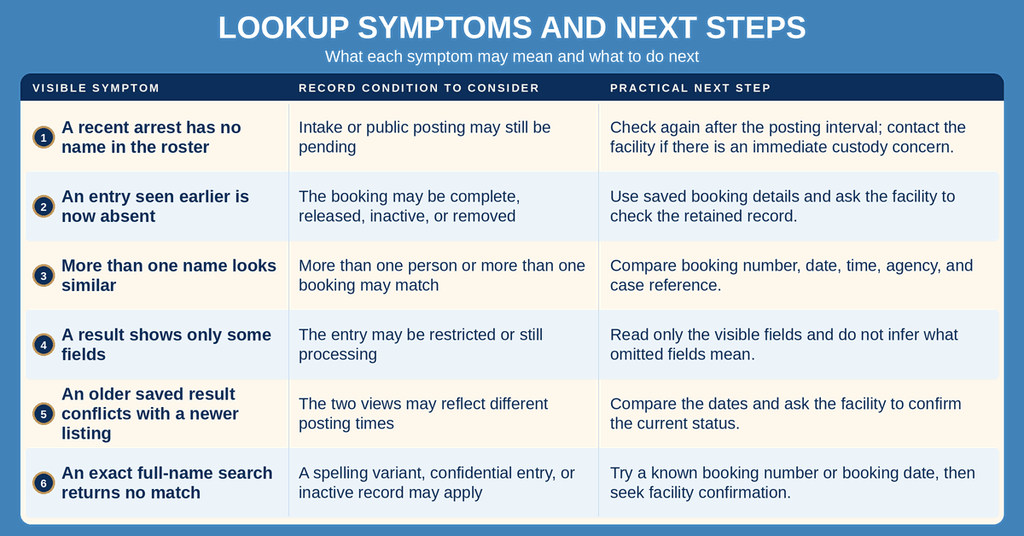
Missing-Record Checks
The table separates a posting gap from a removed or restricted record. It offers a practical next step for each visible symptom without treating one empty search as proof of a person’s status.
Contact Information
Use the facility contact details for questions about a current booking, a missing public entry, or the status shown in the county portal. The listed office hours cover every day and all hours.
Frequently Asked Questions
Find quick answers about locating and understanding current bookings at the Sedgwick County Adult Detention Facility.
How can I search current bookings by name?
Visit the official search portal at https://ssc.sedgwickcounty.org/InmateSearch/. Enter the full or partial name in the name field and submit. The system matches the input with booking records and displays any matches. Results show the booking number, date, location, and status. You can click a record for more details such as charges and bond information. The portal is available 24/7 and does not require an account.
Where do I find today’s booking records online?
Today’s booking records are posted on the same inmate search page used for all current bookings. After opening the site, select the option to view daily records or set the date filter to today’s date. The list updates throughout the day as new intakes are entered. Each entry includes the booking time, facility location, and custody status. The page refreshes automatically, so you see the most recent information without needing to call the facility.
What details appear in a current booking record?
A current booking record shows the booking number, date and time of intake, and the facility where the person is held. It also lists the booking agency, classification, and any charges recorded at intake. Additional fields include bond amount, bail status, and the current custody status such as “awaiting release” or “in process.” If available, the record may display a case reference number and any scheduled transfers.
How often are current booking records updated?
Records are refreshed multiple times each day as new individuals are processed. The online portal reflects changes within a few hours of intake or status updates. If a booking is released, transferred, or has a bond posted, the record updates accordingly. Users can rely on the site for near‑real‑time information, though occasional short delays may occur during high‑volume periods.
How can I tell if someone has been released?
Check the booking status on the individual’s record in the search portal. A status of “released” or “pending release” indicates the person is no longer in custody. The record may also show a release date and time. If the entry is missing, it could mean the release was processed after the last update. For confirmation, you may call the facility at (316) 660‑5245 during any hour.